
 US
US FR
FR ES
ESSEO Cannibalization
Detect conflicts between your pages on Google.
Identify similar queries and stop competing against yourself.
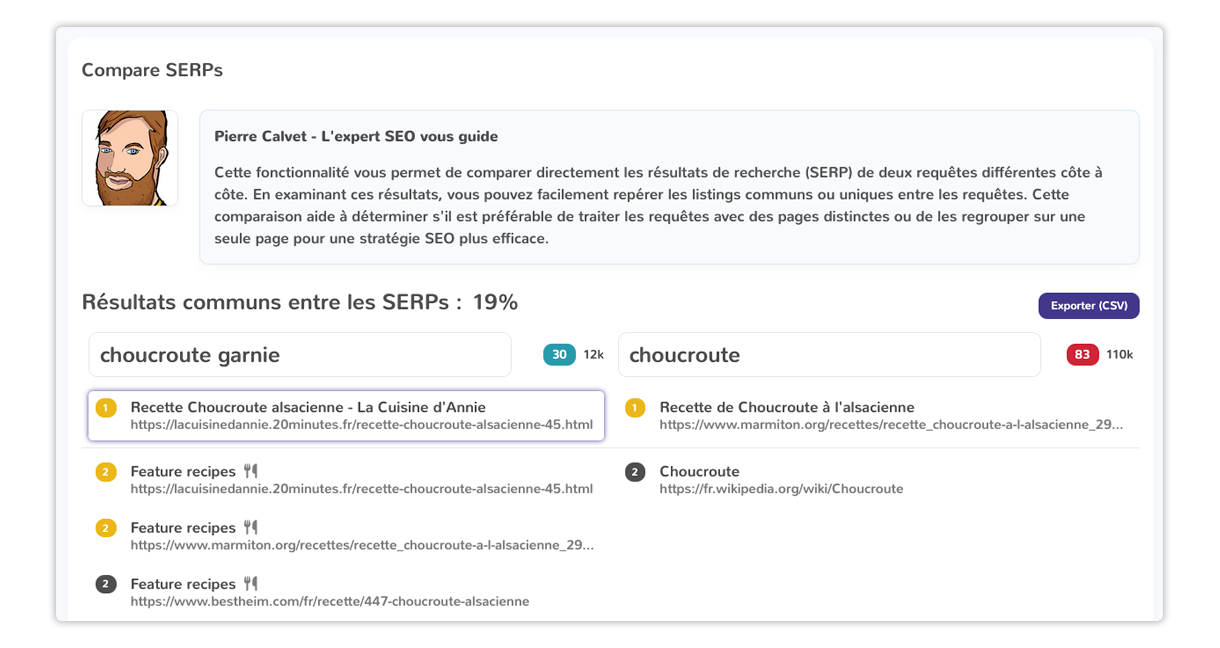
Conflict Detection
Spot the queries where multiple pages on your site are competing against each other in the SERPs.
SERP Visualization
See how Google perceives your competing pages and identify which one to prioritize.
Merge Strategy
Decide whether to merge, differentiate, or remove conflicting pages to consolidate your authority.
Enter your keywords
Input the queries you're targeting. The tool analyzes Google results for each of them.
Identify competing pages
See which pages on your site are competing against each other on the same queries in the SERPs.
Merge or differentiate
Make the strategic decision: merge content, differentiate angles, or remove duplicates.
Avoid SEO cannibalization and optimize your strategy
Why is SEO cannibalization a problem?
If multiple pages on your site compete for similar keywords, Google does not know which one to prioritize. Your authority gets diluted, your traffic is split, and your SEO efforts lose effectiveness. Identifying these conflicts is the first step to focusing your power on the right pages.
Detect similar queries in Google
Yourtext.guru analyzes the SERPs to identify whether multiple keywords return the same pages in results. You can immediately see if your pages are cannibalizing each other, which query clusters trigger similar results, and you receive recommendations to fix the situation.
Fix and optimize your strategy
Once conflicts are detected, merge or consolidate your content to strengthen your authority, optimize search intent by targeting distinct variations, and structure your internal linking to guide Google to the right page.
No commitment · Cancel anytime
Still have questions?
What should I do if two of my pages are cannibalizing each other?
Is SEO cannibalization always a bad thing?
What are the benefits of fixing cannibalization issues?
How can I prevent SEO cannibalization in the future?